Future SMS1.7
Publisher Description
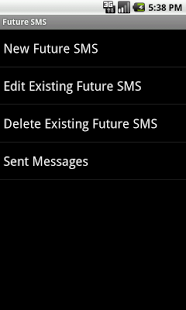
1) Forgot to wish girlfriend on her b’day right at 12.00!!
2) Couldn’t get the chance to send marriage wishes because you were in a meeting with a client!!
3) Missed to send the important update to your group!!
..Not a problem anymore. Now with "Future SMS" you can set the date, time and message of your choice and save it for the Future! Whenever that date/time comes your Future SMS will be sent automatically..
Key points
- Smooth interface
- Support for various Screen Sizes
- Send the SMS automatically without bothering you
- Either choose the contact from Contacts or enter the number manually
- Option to Edit or Delete the Pending Future SMSes
- See the list of SMS that has been already sent
- Standard 160 character for SMS support
- Standard SMS charges apply to send the message
- Application is available to over 400+ device types
Tags: Future SMS, neil baphna, send future sms, sms date, sms time, delayed sms, tomorrow sms, forgot sms, reminder sms, set sms for future
About Future SMS
The company that develops Future SMS is Neil Baphna. The latest version released by its developer is 1.7. This app was rated by 1 users of our site and has an average rating of 4.0.
To install Future SMS on your Android device, just click the green Continue To App button above to start the installation process. The app is listed on our website since 2013-06-15 and was downloaded 7 times. We have already checked if the download link is safe, however for your own protection we recommend that you scan the downloaded app with your antivirus. Your antivirus may detect the Future SMS as malware as malware if the download link to app.FinalFutureSMS is broken.
How to install Future SMS on your Android device:
- Click on the Continue To App button on our website. This will redirect you to Google Play.
- Once the Future SMS is shown in the Google Play listing of your Android device, you can start its download and installation. Tap on the Install button located below the search bar and to the right of the app icon.
- A pop-up window with the permissions required by Future SMS will be shown. Click on Accept to continue the process.
- Future SMS will be downloaded onto your device, displaying a progress. Once the download completes, the installation will start and you'll get a notification after the installation is finished.
Program Details
System requirements
Download information
Pricing
Version History
version 1.7
posted on 2013-06-15
version 1.7
posted on 2013-06-15
Several fixes and updates
